AI-native financial management
Rebuilding a 40-year-old financial management platform for a US digital bank, with AI agents that take on the repetitive work.
Try the interactive prototype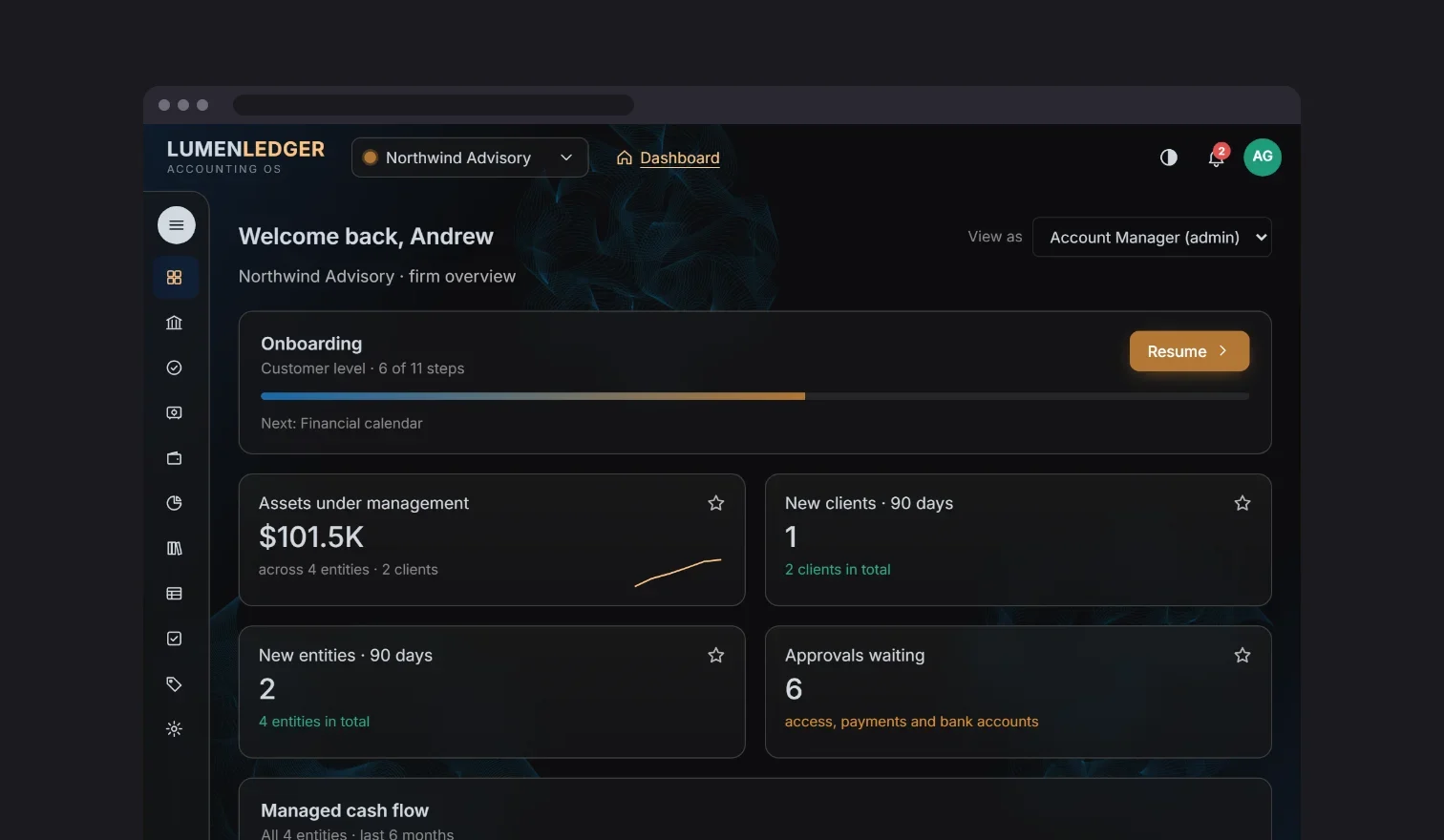
- Project role
- Design lead
- Team
- up to 5 designers (1 Principal, 2 Senior, 2 Junior)
- Timeline
- 2024–present
- Platform
- Desktop web app (SaaS)
- Status
- In progress
Early signals
- 32 modules delivered so far.
- Rework down 85% since each module started as an AI prototype that settled the requirements first.
- In continuous testing by 8–10 of the bank’s product and ops team members. Client beta testing begins in January 2027.
- Leadership approved the design direction and AI features.
My part in this
- Decision I influenced
- Keeping people in the loop on agent payments. Trust in the AI needed more than oversight, so people also control the success thresholds the agent must meet.
- What I pushed back on
- Dev and BA teams rebuilding components screen by screen. I pushed for shared components with feature flags and smaller component stories, which raised consistency and cut rework.
- Trade-off I made
- The client wanted to skip user research for early speed, which risked rework later. I used AI prototypes and user testing before development to lock in the direction.
- What I noticed
- Onboarding was slow because a web of setup steps came before a single payment. A wizard got users working on what mattered while admins backfilled optional details.
- What changed because I was there
- AI prototypes turned requirements from spreadsheets into working conversations and cut redesign, freeing my team to support UI development and QA at the end of each module.
The problem
Business managers and accountants run their clients’ books on a 40-year-old platform at a US digital bank. It’s a complex, high-stakes workflow that had gone largely unchanged for decades. Even setup follows a strict order the old system kept hidden: a bank account needs an entity, a GL account and a chart of accounts first. The old system ran on green-screen, DOS-style screens with F-key navigation, and its workflows were so confusing that the bank’s ops team provided white-glove support for simple tasks like creating a user role.
My team is leading the ground-up redesign, using AI agents to take on repetitive data work while people keep control of every decision that moves money. The foundation is in place: an agent, Quill, that reads bills and drafts payables. A chat helper and a document sorter are next on the roadmap. The goal: firms can run their own setup, and white-glove support becomes a choice instead of a necessity.
Two calls shaped how we build. Instead of dev and BA teams rebuilding components screen by screen, I pushed for shared components behind feature flags and smaller component stories. And when the client wanted to skip user research for early speed, I used AI prototypes and user testing before development to lock in the direction.
What I did
Key insight In accounting, a confident mistake costs more than a slow answer. The AI should take on the tedious work, the product should enforce the structure, and people should stay in control of anything that moves money.
- 01
The agent drafts, a person approves
Bills arrive by email or are uploaded by the firm. Once a bill is categorized and marked for automation, an agent reads it and drafts the payable next to the original bill. Each draft gets a confidence score, and each firm sets its own alert thresholds in the agent settings. Low-confidence fields and mismatches are flagged and easy to find during approval. Every agent action and human correction is recorded in the payable’s history, and corrections help the agent improve.
Trade-off: A required approval slows down the cases the agent gets right. For payments going out, we chose trust over speed. Because the flags are clear, a clean draft is approved in seconds, and the review only takes real time when something actually needs a person.
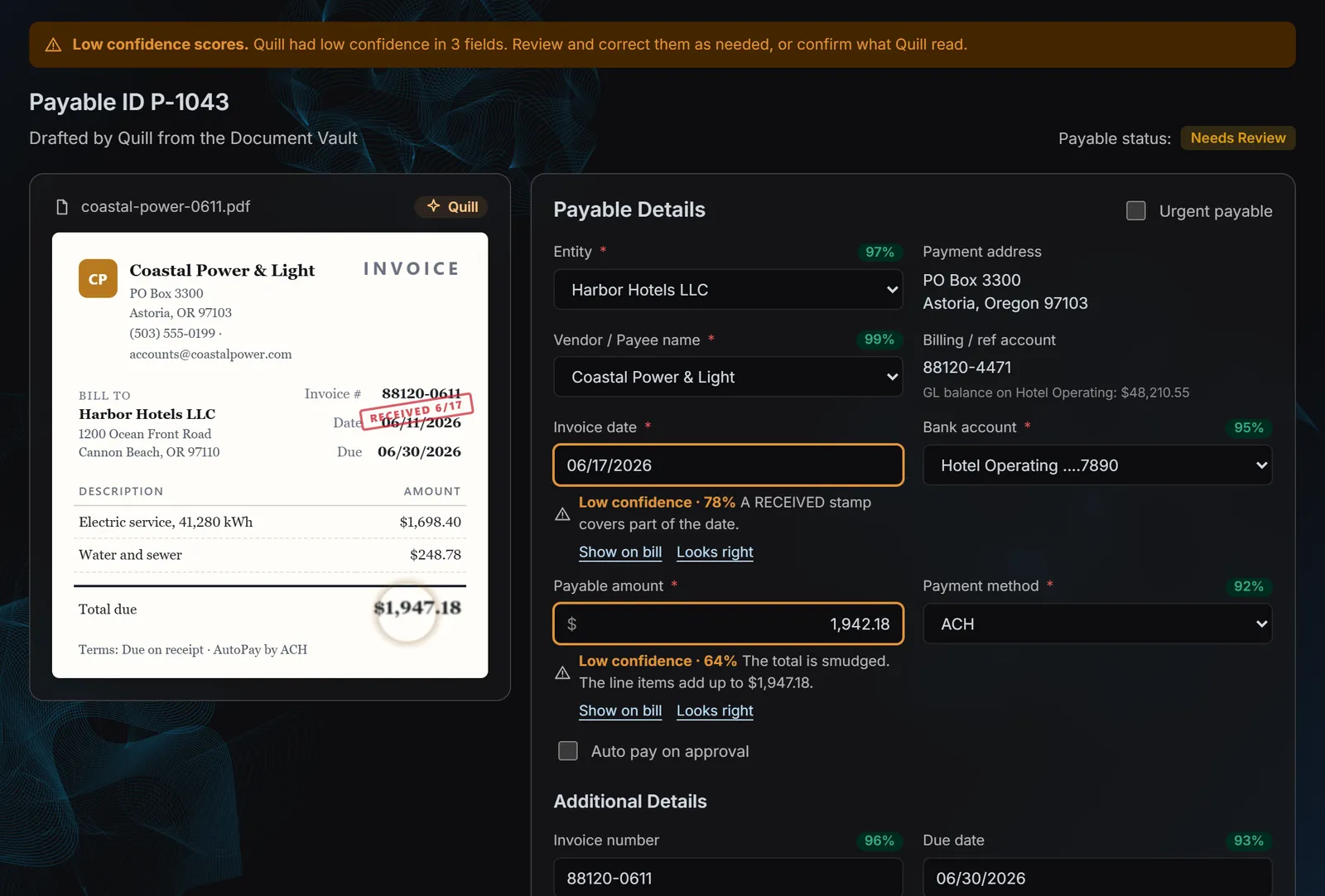
Quill drafts the payable beside the bill and flags the fields it isn’t sure of. 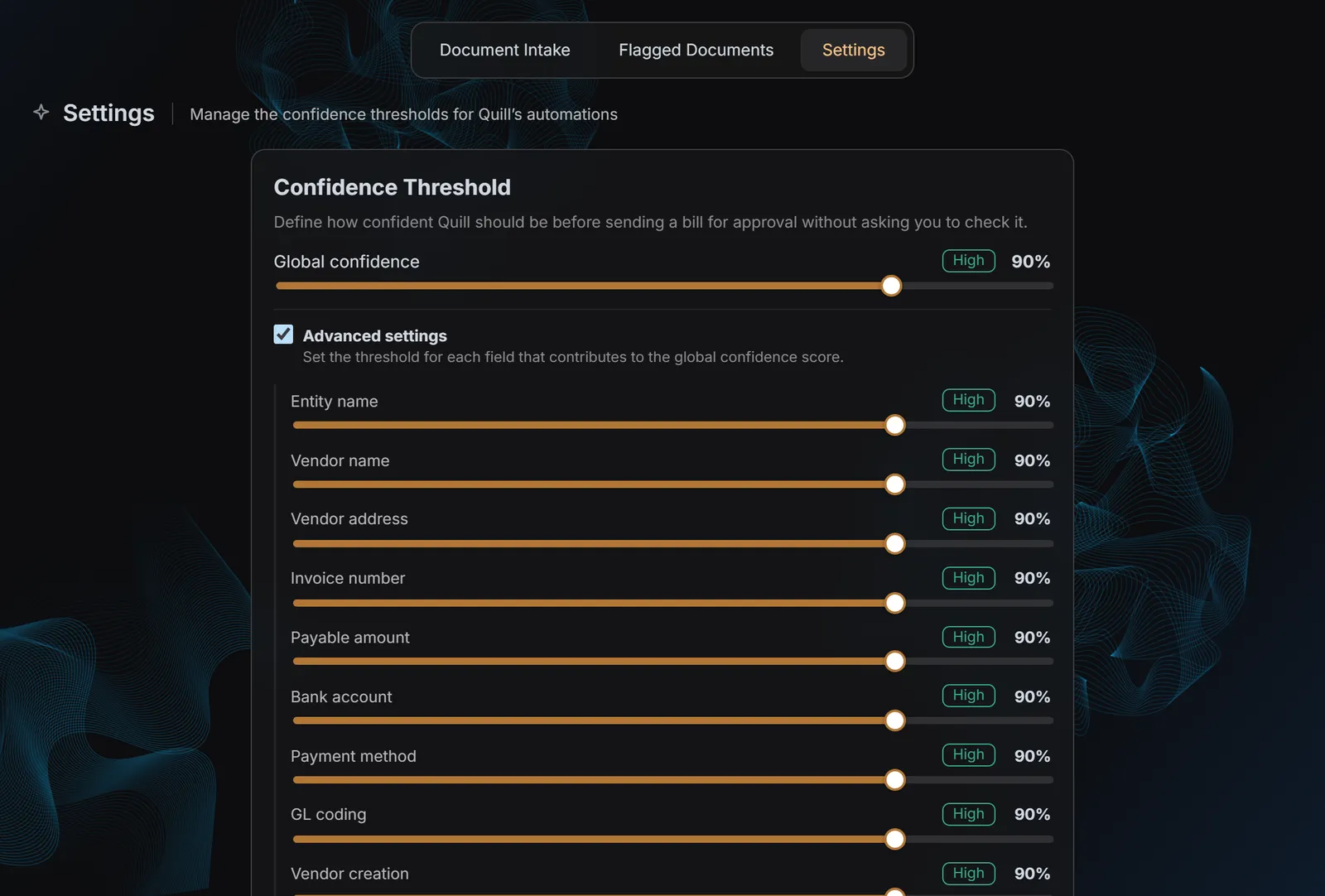
Each firm sets how confident Quill must be, globally or per field. - 02
Setup as a dependency map
I turned the hidden order of accounting setup into visible next steps, and that map became the backbone of an onboarding wizard that asks only for mandatory fields and saves every step as it goes.
Trade-off: A guided order slows down experts who already know the sequence. Every step is still available from its own screen, so the wizard is a shortcut, not a gate.
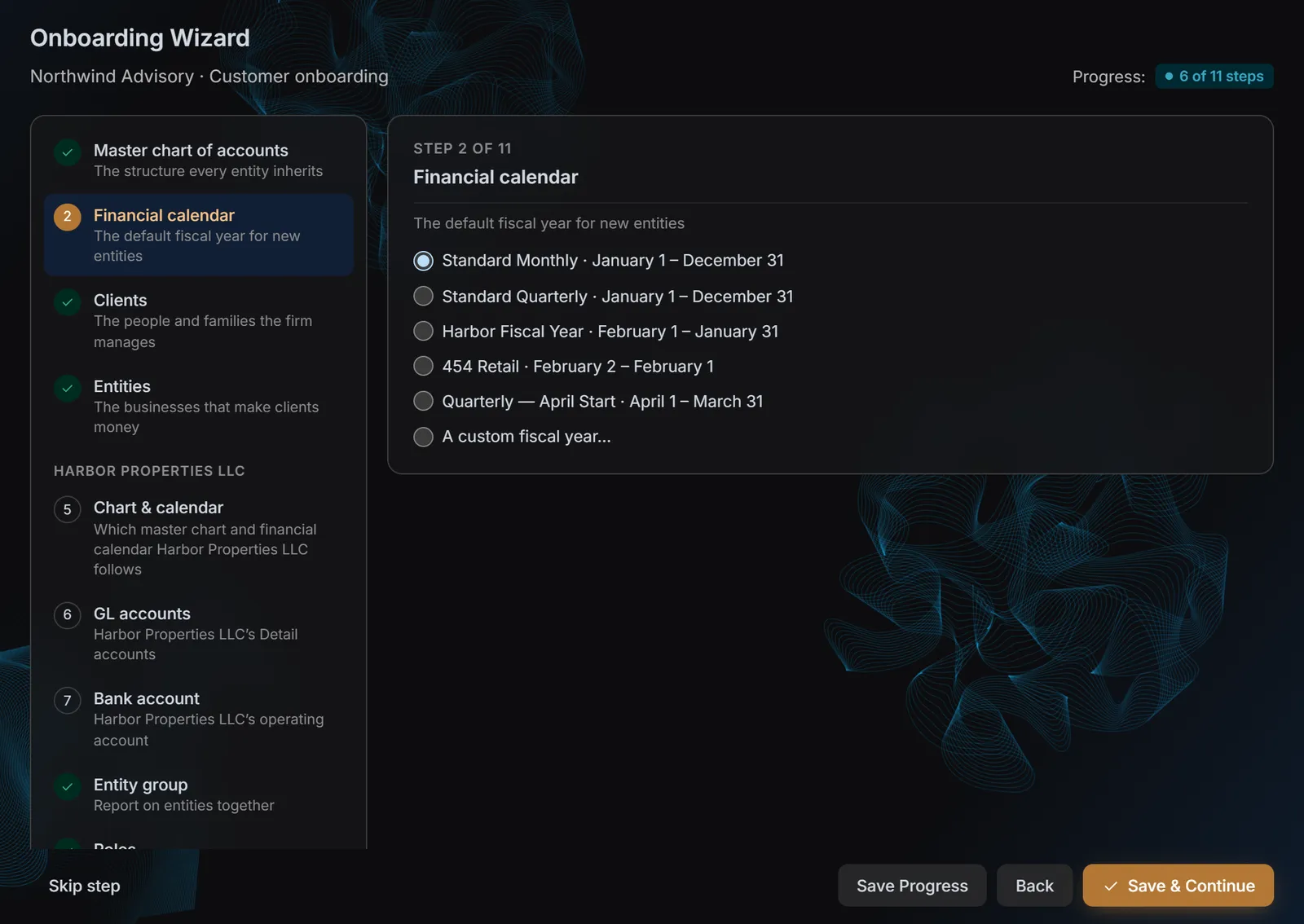
The wizard follows the setup dependency map and saves every step. - 03
The account number decides the parent
Each Summary account owns a range of numbers, and each Sub-Totaling account owns a slice of it. Typing 1150-200 places the account under 1100-000 before it’s saved. There’s no parent dropdown to get wrong.
Trade-off: Without a dropdown, the numbering has to be right. Numbers that would split an existing range are blocked, and the accounts in the way are named, so the fix is obvious.
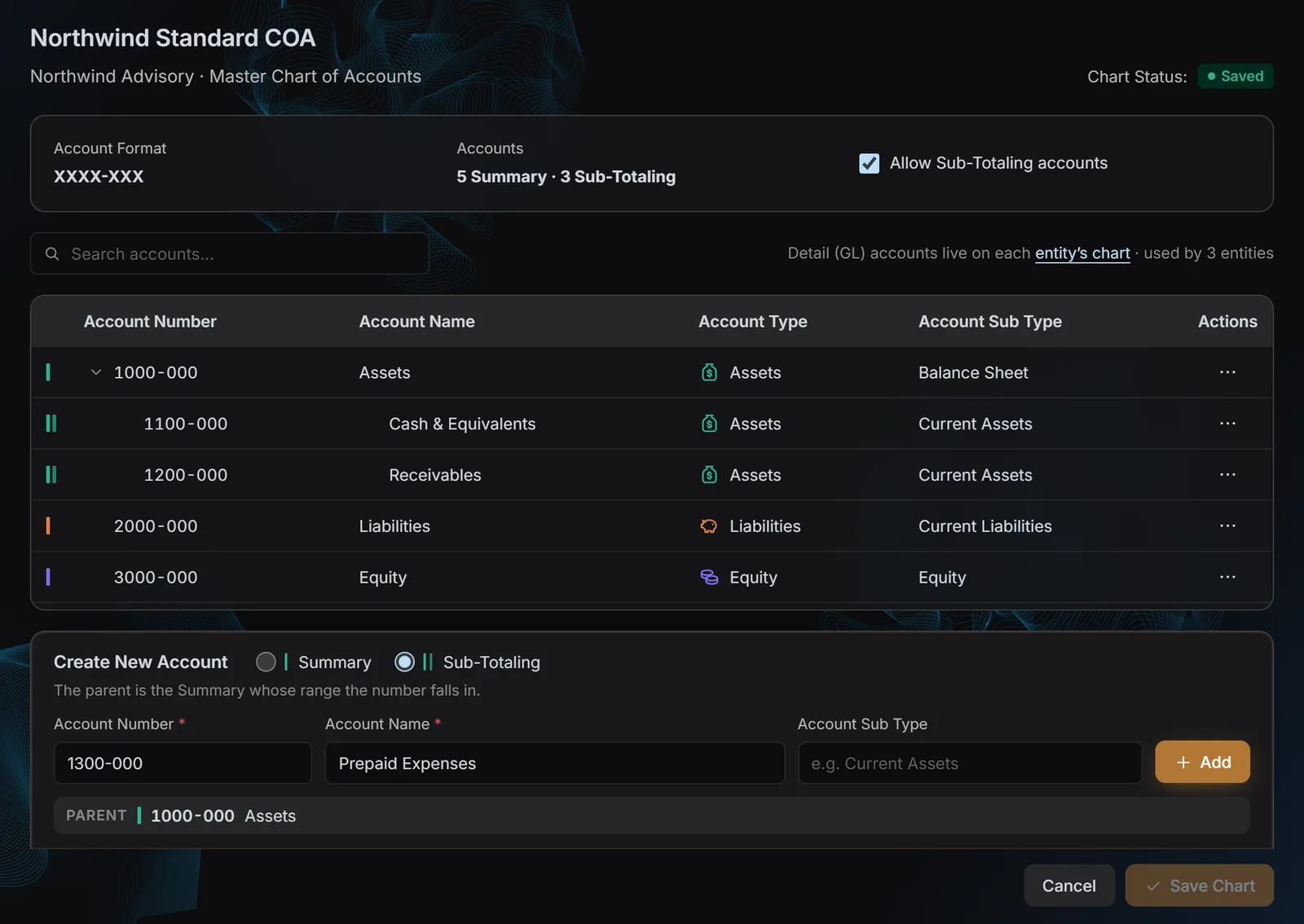
Type the account number and its parent is found from the range.
What I’d do differently
Building Quill showed me how much an early agent depends on the definitions it’s given. Questions like what counts as a recurring bill versus an installment surfaced mid-build and had to be settled quickly. Our AI developers handled them well, but next time I’d map those edge cases with product and research before the first prototype, and look at the scope from more angles than the obvious ones.